MMDBForge
MMDB Forge
Русская версия: README.ru.md
MMDB Forge is a developer toolkit for inspecting, validating, diffing, and explaining custom MaxMind DB files.
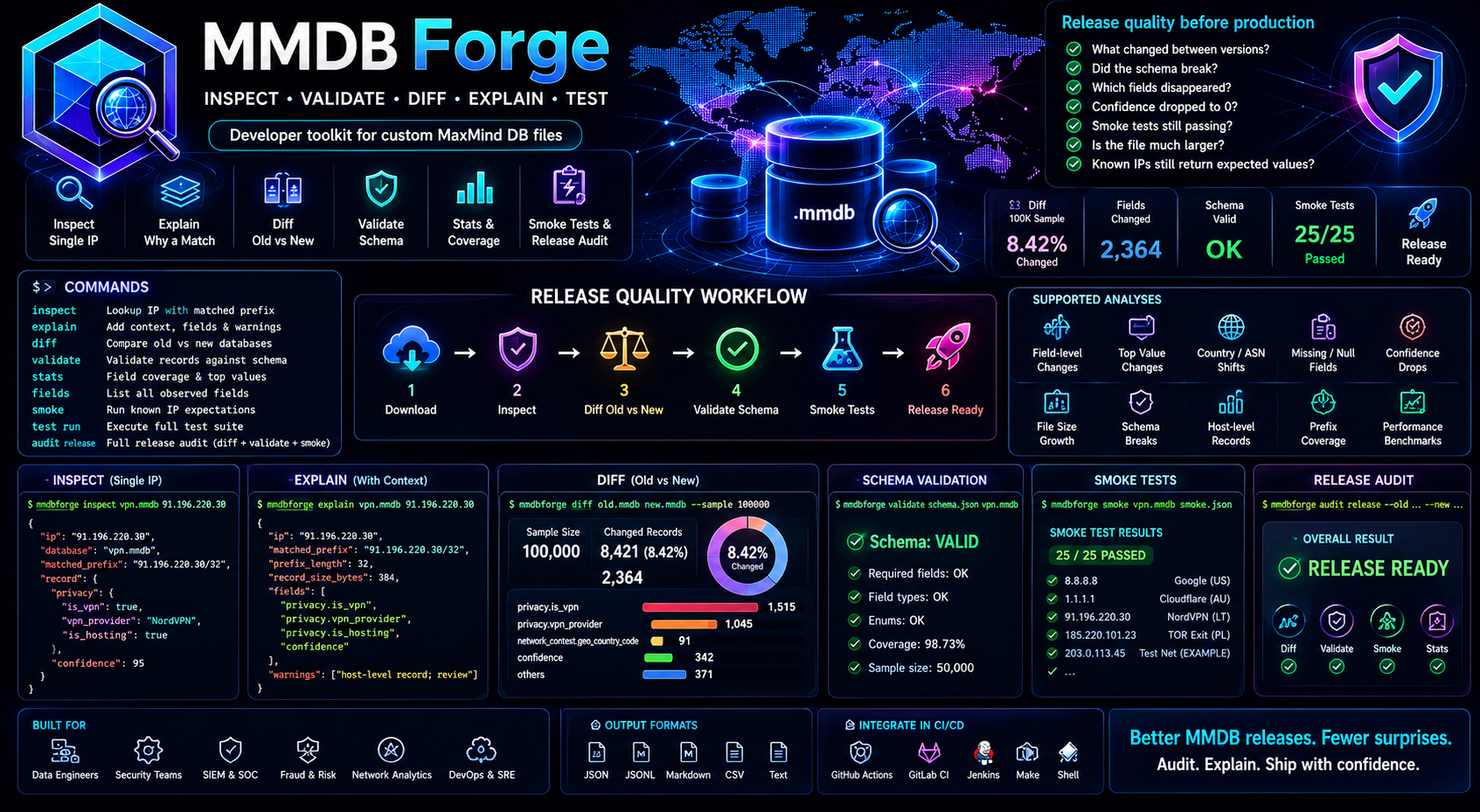
Most MaxMind DB tools are built around one question:
What does this IP resolve to?
MMDB Forge is built for people who generate, ship, and maintain their own .mmdb
files. It helps answer the questions that matter before a database release goes
to production:
What changed between two versions?
Did the schema break?
Why did this IP get this record?
Which fields disappeared?
How many prefixes changed country, ASN, VPN status, confidence, or risk score?
Where did confidence suddenly become 0?
Which records became null?
Did the file become much larger?
Do known test IPs still return the expected values?
Think of it as jq + diff + validator + CI guardrails for .mmdb releases.
What It Does
MMDB Forge is both a CLI and a small Go codebase organized around MMDB release quality checks.
It can:
- inspect a single IP lookup with the matched network prefix
- explain why a record matched and surface suspicious record details
- compare old and new database versions on sampled records or a fixed IP list
- validate records against a simple JSON schema
- list all observed fields in a database
- calculate field coverage and top values
- run smoke tests for known IP expectations
- run a full release audit that combines diff, stats, schema validation, and smoke tests
Install
From source:
git clone https://github.com/ipanalytics/MMDBForge.git
cd mmdbforge
go build ./cmd/mmdbforge
Install the local checkout into your GOBIN:
go install ./cmd/mmdbforge
Check the CLI:
mmdbforge --help
Quick Start
Inspect an IP:
mmdbforge inspect vpn.mmdb 91.196.220.30
Compare two releases:
mmdbforge diff vpn-2026-05-20.mmdb vpn-2026-05-21.mmdb --sample 100000
Validate records against a schema:
mmdbforge validate examples/vpn.schema.json vpn.mmdb --sample 50000
Run a release audit:
mmdbforge audit release \
  --old vpn-2026-05-20.mmdb \
  --new vpn-2026-05-21.mmdb \
  --schema examples/vpn.schema.json \
  --smoke examples/smoke.json \
  --sample 100000 \
  --markdown report.md
Commands
mmdbforge inspect <db.mmdb> <ip>
mmdbforge explain <db.mmdb> <ip>
mmdbforge explain-diff <old.mmdb> <new.mmdb> <ip>
mmdbforge lint cidr <prefixes.txt|prefixes.csv|prefixes.jsonl>
mmdbforge diff <old.mmdb> <new.mmdb> [flags]
mmdbforge validate <schema.json> <db.mmdb> [flags]
mmdbforge stats <db.mmdb> [flags]
mmdbforge stats diff <old.mmdb> <new.mmdb> [flags]
mmdbforge fields <db.mmdb> [flags]
mmdbforge smoke <db.mmdb> <smoke.json>
mmdbforge test run <config.yaml> [--output run.json]
mmdbforge test compare <baseline.json> <current.json> [--output compare.json]
mmdbforge test report <compare.json> [--markdown [file]] [--html [file]]
mmdbforge prefixes <db.mmdb> [new.mmdb] [flags]
mmdbforge bench <db.mmdb> [new.mmdb] [flags]
mmdbforge audit release --old <old.mmdb> --new <new.mmdb> [flags]
All commands print pretty JSON by default. diff and audit release can also
write Markdown reports.
inspect
inspect performs a lookup and returns the record together with the matched
network prefix.
mmdbforge inspect vpn.mmdb 91.196.220.30
Example output:
{
  "ip": "91.196.220.30",
  "database": "vpn.mmdb",
  "matched_prefix": "91.196.220.30/32",
  "record": {
    "privacy": {
      "is_vpn": true,
      "vpn_provider": "NordVPN",
      "is_hosting": true
    },
    "confidence": 95
  }
}
Use it when you want a direct, debuggable lookup without writing a small Go program or piping raw data through another tool.
explain
explain shows the lookup result plus useful context about the matched record.
mmdbforge explain vpn.mmdb 91.196.220.30
Example output:
{
  "ip": "91.196.220.30",
  "database": "vpn.mmdb",
  "matched_prefix": "91.196.220.30/32",
  "prefix_length": 32,
  "record_size_bytes": 384,
  "fields": [
    "privacy.is_vpn",
    "privacy.vpn_provider",
    "privacy.is_hosting",
    "confidence"
  ],
  "warnings": [
    "matched host-level record; check if this database intentionally stores host-level entries"
  ],
  "record": {
    "privacy": {
      "is_vpn": true,
      "vpn_provider": "NordVPN",
      "is_hosting": true
    },
    "confidence": 95
  }
}
This is useful when a generated database has unexpected host-level records, missing risk explanation fields, or confidence values outside the expected range.
diff
diff is the main release-safety command.
It samples records from the old database, looks up the same IPs in the new database, and reports record-level and field-level changes.
mmdbforge diff old.mmdb new.mmdb --sample 100000
Example output:
{
  "sample_size": 100000,
  "changed_records": 8421,
  "changed_percent": 8.42,
  "field_changes": {
    "privacy.is_vpn": {
      "false_to_true": 1203,
      "true_to_false": 312
    },
    "privacy.vpn_provider": {
      "changed": 842,
      "added": 1203,
      "removed": 312
    },
    "network_context.geo_country_code": {
      "changed": 91
    }
  },
  "top_changes": [
    {
      "field": "privacy.vpn_provider",
      "old": null,
      "new": "NordVPN",
      "count": 433
    },
    {
      "field": "network_context.geo_country_code",
      "old": "GB",
      "new": "US",
      "count": 28
    }
  ],
  "failed": false
}
Useful flags:
--sample 100000
--full
--ips test-ips.txt
--fields privacy.is_vpn,privacy.vpn_provider
--json
--markdown
--markdown report.md
--fail-on-change privacy.is_vpn
--fail-on-drop confidence
--fail-on-missing-field confidence
--fail-threshold changed_percent=20
Examples:
mmdbforge diff old.mmdb new.mmdb \
  --sample 100000 \
  --fields privacy.is_vpn,privacy.vpn_provider,confidence
mmdbforge diff old.mmdb new.mmdb \
  --ips fixtures/release-check-ips.txt \
  --fail-on-change privacy.is_vpn
mmdbforge diff old.mmdb new.mmdb \
  --sample 100000 \
  --fail-threshold changed_percent=25 \
  --fail-on-missing-field confidence
diff is intentionally sampling-based by default. For very large databases,
this gives a fast release signal without requiring a full exhaustive comparison.
For deterministic checks, pass a fixed IP list with --ips. For exhaustive
database traversal, use --full.
explain-diff
explain-diff explains exactly what changed for one IP between two database
versions.
mmdbforge explain-diff old.mmdb new.mmdb 91.196.220.30
It returns the old matched prefix, new matched prefix, old record, new record, and a sorted list of changed dotted fields. This is the fastest way to debug a single customer-reported IP or a smoke-test regression.
lint cidr
lint cidr checks raw source prefixes before they are compiled into MMDB.
mmdbforge lint cidr prefixes.txt
mmdbforge lint cidr prefixes.csv
mmdbforge lint cidr prefixes.jsonl
Supported input:
- plain text: first token is CIDR
- CSV/TSV: first column is CIDR
- JSONL:
cidr,network, orprefixstring field
It reports invalid CIDRs, duplicate CIDRs, and narrower prefixes shadowed by a broader prefix. This catches source data mistakes that are hard to reconstruct after the database has already been compiled.
validate
validate checks sampled records against a JSON schema.
mmdbforge validate examples/vpn.schema.json vpn.mmdb --sample 50000
Schema example:
{
  "required": [
    "privacy.is_vpn",
    "confidence"
  ],
  "fields": {
    "privacy.is_vpn": {
      "type": "boolean"
    },
    "privacy.vpn_provider": {
      "type": ["string", "null"]
    },
    "confidence": {
      "type": "integer",
      "minimum": 0,
      "maximum": 100
    },
    "risk_score": {
      "type": "integer",
      "minimum": 0,
      "maximum": 100
    }
  },
  "rules": [
    {
      "if": "privacy.is_vpn == true",
      "then_required": ["privacy.privacy_service"]
    },
    {
      "if": "risk_score >= 80",
      "then_required": ["risk_reasons"]
    }
  ]
}
Example output:
{
  "checked_records": 50000,
  "errors": [
    {
      "ip": "91.196.220.30",
      "matched_prefix": "91.196.220.30/32",
      "field": "risk_reasons",
      "message": "risk_score >= 80 requires risk_reasons"
    }
  ]
}
Supported schema features:
required: dotted field paths that must existtype:string,integer,number,boolean,object,array,nullminimumandmaximumfor numeric fieldsrules: simple conditional requirements using==,!=,>,>=,<,<=
The schema format is deliberately small. It is meant for MMDB release contracts, not for modeling every possible JSON Schema feature.
MMDB Forge also accepts a basic JSON Schema-style object with required and
nested properties. Nested properties are flattened into dotted MMDB field
paths before validation.
stats
stats summarizes metadata, file size, field coverage, and top scalar values.
mmdbforge stats vpn.mmdb --sample 10000 --top 10
Example output:
{
  "database_type": "ipanalytics-vpn",
  "ip_version": ["ipv4", "ipv6"],
  "build_epoch": 1779364800,
  "node_count": 1842201,
  "file_size_mb": 96.4,
  "checked_records": 10000,
  "field_coverage": {
    "privacy.is_vpn": 100.0,
    "privacy.vpn_provider": 84.2,
    "confidence": 99.9,
    "risk_reasons": 22.1
  },
  "top_values": {
    "privacy.vpn_provider": [
      ["NordVPN", 1204],
      ["Surfshark", 881],
      ["ExpressVPN", 604]
    ],
    "network_context.connection_type": [
      ["hosting", 9012],
      ["residential", 552]
    ]
  }
}
Use stats when you want to know whether a release changed shape even before
looking at exact field transitions.
Compare field coverage between two releases:
mmdbforge stats diff old.mmdb new.mmdb --sample 100000
mmdbforge stats diff old.mmdb new.mmdb --full
mmdbforge stats diff old.mmdb new.mmdb --sample 100000 --table
fields
fields lists every dotted field path observed in sampled records.
mmdbforge fields vpn.mmdb --sample 10000
Example output:
{
  "checked_records": 10000,
  "fields": [
    "confidence",
    "network_context.geo_country_code",
    "privacy.is_hosting",
    "privacy.is_vpn",
    "privacy.vpn_provider",
    "risk_reasons",
    "risk_score"
  ]
}
This is useful when creating a schema for an existing database or investigating whether a generator accidentally renamed or removed fields.
smoke
smoke runs regression tests for known IPs.
mmdbforge smoke vpn.mmdb examples/smoke.json
Smoke file:
[
  {
    "ip": "91.196.220.30",
    "expect": {
      "privacy.is_vpn": true,
      "privacy.vpn_provider": "NordVPN"
    }
  },
  {
    "ip": "8.8.8.8",
    "expect": {
      "profile.is_anycast": true
    }
  }
]
Example output:
{
  "checked": 2,
  "passed": 1,
  "failed": 1,
  "results": [
    {
      "ip": "91.196.220.30",
      "passed": true
    },
    {
      "ip": "8.8.8.8",
      "passed": false,
      "failures": [
        {
          "field": "profile.is_anycast",
          "expected": true,
          "actual": false,
          "message": "value mismatch"
        }
      ]
    }
  ]
}
Smoke tests are best for high-value examples: known VPN exits, known residential IPs, known anycast IPs, test prefixes, internal fixtures, and customer-reported edge cases.
Smoke cases support exact expectations, allowed value sets, and denied value sets:
{
  "ip": "91.196.220.30",
  "expect": {
    "privacy.is_vpn": true,
    "privacy.vpn_provider": "NordVPN"
  },
  "allow": {
    "geo.city_name": ["Los Angeles", "London"]
  },
  "deny": {
    "privacy.vpn_provider": [null, ""]
  }
}
test
test is the MMDB Forge testbench. It turns golden IP samples into reusable
release artifacts.
Run a testbench config:
mmdbforge test run examples/ipbench.yaml --output baseline.json
Run it again for a new database version:
mmdbforge test run examples/ipbench.yaml --output current.json
Compare two runs:
mmdbforge test compare baseline.json current.json --output compare.json
Generate reports:
mmdbforge test report compare.json --markdown testbench.md
mmdbforge test report compare.json --html testbench.html
Config example:
name: vpn-release-golden-samples
database: vpn.mmdb
fields:
  - privacy.is_vpn
  - privacy.vpn_provider
  - network.connection_type
  - geo.city_name
cases:
  - ip: 91.196.220.30
    expect:
      privacy.is_vpn: true
      privacy.vpn_provider: NordVPN
      network.connection_type: hosting
    allow:
      geo.city_name:
        - Los Angeles
        - London
    deny:
      privacy.vpn_provider:
        - ""
        - null
This is the “unit tests for IP intelligence databases” layer: exact expected fields, tolerated alternatives, forbidden values, persistent run artifacts, run comparison, and HTML/Markdown reports.
prefixes
prefixes checks prefix-shape distribution and warns when host-level records
dominate the sampled networks.
mmdbforge prefixes vpn.mmdb --sample 100000 --table
mmdbforge prefixes vpn.mmdb --full
mmdbforge prefixes old.mmdb new.mmdb --sample 100000
This catches release mistakes such as unexpected /32 or /128 explosions.
Compiled MMDB data is already stored as a search trie, so this is a release
shape check for the built database rather than a raw source CIDR overlap linter.
bench
bench measures sampled lookup throughput.
mmdbforge bench vpn.mmdb --sample 100000 --table
mmdbforge bench vpn.mmdb --full
mmdbforge bench old.mmdb new.mmdb --sample 100000
Use it to catch releases that become significantly slower even when schema and smoke tests pass.
audit release
audit release combines the core release checks into one command.
mmdbforge audit release \
  --old vpn-2026-05-20.mmdb \
  --new vpn-2026-05-21.mmdb \
  --schema examples/vpn.schema.json \
  --smoke examples/smoke.json \
  --policy examples/release.policy.json \
  --sample 100000 \
  --markdown report.md \
  --html report.html
It runs:
- metadata and file size checks
- sampled diff
- field coverage stats
- field coverage diff
- prefix-shape checks
- lookup benchmark comparison
- release policy gates
- standalone Markdown and HTML reports
- schema validation
- known IP smoke tests
- release verdict generation
Markdown output example:
# MMDB Release Audit

Verdict: WARN

- 8.42% sampled records changed
- file size changed 4.80%
- schema validation errors: 0
- smoke tests failed: 0
Verdicts:
PASS: no configured checks failedWARN: suspicious but not contract-breaking changes, such as a large file size increaseFAIL: schema validation or smoke tests failed
Policy example:
{
  "max_changed_percent": 25,
  "max_file_growth_percent": 50,
  "max_lookup_slowdown_percent": 25,
  "max_host_level_growth_percent": 50,
  "required_fields": [
    "privacy.is_vpn",
    "confidence"
  ],
  "allowed_dropped_fields": []
}
CI Example
MMDB Forge is designed to be useful in CI.
name: MMDB release checks

on:
  pull_request:
  workflow_dispatch:

jobs:
  audit:
    runs-on: ubuntu-latest
    steps:
      - uses: actions/checkout@v4

      - uses: actions/setup-go@v5
        with:
          go-version: "1.22"

      - name: Install mmdbforge
        run: go install ./cmd/mmdbforge

      - name: Audit MMDB release
        run: |
          mmdbforge audit release \
            --old artifacts/vpn-previous.mmdb \
            --new artifacts/vpn-current.mmdb \
            --schema examples/vpn.schema.json \
            --policy examples/release.policy.json \
            --smoke fixtures/vpn-smoke.json \
            --sample 100000 \
            --markdown report.md \
            --html report.html

      - name: Upload report
        uses: actions/upload-artifact@v4
        with:
          name: mmdb-audit-report
          path: |
            report.md
            report.html
For stricter release gates, use diff directly:
mmdbforge diff artifacts/vpn-previous.mmdb artifacts/vpn-current.mmdb \
  --sample 100000 \
  --fail-threshold changed_percent=25 \
  --fail-on-missing-field confidence \
  --fail-on-drop privacy.vpn_provider
Data Model
MMDB Forge flattens nested record fields into dotted paths:
{
  "privacy": {
    "is_vpn": true,
    "vpn_provider": "NordVPN"
  },
  "confidence": 95
}
becomes:
privacy.is_vpn
privacy.vpn_provider
confidence
This makes schema rules, diff summaries, CI checks, and smoke expectations easy to write and easy to review.
Why This Exists
When teams build their own MMDB files, failures are rarely obvious from a single lookup. Real release problems look like this:
the new database is 3x larger
some fields disappeared
country_code suddenly became registry country
confidence escaped the 0..100 range
all VPN records became risk_score=100
/32 records exploded unexpectedly
provider names disappeared
IPv6 coverage broke
known smoke-test IPs changed behavior
MMDB Forge gives those problems names, commands, and CI failure modes.
Project Layout
cmd/mmdbforge/      CLI entrypoint
internal/lookup/    inspect and explain commands
internal/diff/      sampled release diff
internal/schema/    schema validation
internal/stats/     field coverage and top values
internal/smoke/     known IP regression tests
internal/audit/     release audit orchestration
internal/report/    JSON and Markdown output
examples/           schema and smoke examples
docs/               command guides and CI notes
License
MIT. See LICENSE.